
KIOSK Display Rental
-

43 Inch Horizontal Touch Screen KIOSK Rental
43″ Interactive Touch Screen Rental – Horizontal Touch Screen Display
Rent 43″ Interactive Touch Screen Display for upcoming events like conferences, trade shows, activations, and exhibitions, this horizontal touch screen brings interactive engagement to the next level. With its stunning full-HD resolution and customizable features, it’s the ideal solution for showcasing content, wayfinding, branding, and more.
-
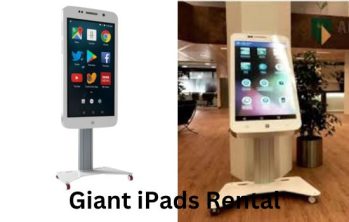
Giant iPad Rental
At LED Screen Rental, we offer Giant iPad Rentals that provide a sleek, interactive experience for your trade shows, corporate events, product launches, and marketing activations. These oversized iPads function just like the real thing—only bigger, bolder, and more engaging!
Our event rental services are available in major cities across the USA, catering to Fortune 500 companies, small businesses, and event planners looking for high-impact display solutions.
-
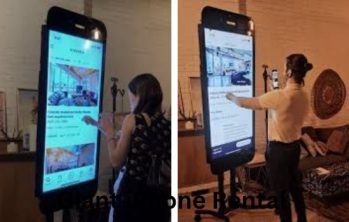
Giant iPhone Rental
Giant iPhone Rental – A Bigger, Bolder, and More Interactive Experience!
Looking for a show-stopping display to engage your audience at your next event? At LED Screen Rental, we provide Giant iPhone Rentals to create an interactive and visually striking experience for trade shows, corporate events, product launches, marketing activations, and more.
Our event rental services are available in major cities across the USA, catering to Fortune 500 companies, small businesses, and event planners who trust us to deliver high-impact display solutions.
-
Queue Kiosk Rental
Efficiently managing queues and enhancing the customer experience at events, conferences, or retail environments is made easy with Queue Kiosk Rentals. These self-service kiosks are designed to streamline the check-in process, facilitate ticketing, and improve overall crowd control while adding a modern, tech-savvy touch to your event. Whether you’re hosting a large-scale conference, concert, trade show, or managing a high-traffic location, our Queue Kiosk Rentals provide a seamless solution for both event organizers and attendees.
-
Touch Screen Kiosk Rental
Make your event more interactive and efficient with Touch Screen Kiosk Rentals. These kiosks provide an intuitive, user-friendly interface that allows attendees to engage with your content easily. Whether you need to manage check-ins, display event information, or collect feedback, these touch screen kiosks are the perfect solution for high-traffic environments like conferences, trade shows, exhibitions, and retail spaces.
-
Tradeshow Interactive Kiosk Rental
Engage your attendees and make a lasting impression at your next trade show or exhibition with Tradeshow Interactive Kiosk Rentals. These cutting-edge kiosks offer a hands-on, interactive experience that allows attendees to engage with your content in an informative and entertaining way. Whether you’re showcasing products, providing event information, or collecting leads, these kiosks are designed to capture attention and drive engagement in high-traffic environments.
-
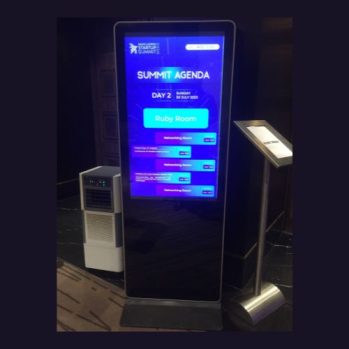
Vertical Ad Player Kiosk Rental
Looking for a modern and engaging way to showcase your brand, products, or services? Our Vertical Ad Player Kiosk Rental is the perfect solution for events, retail spaces, trade shows, and conferences. These sleek, high-definition digital kiosks deliver dynamic content, including videos, images, and interactive displays, ensuring maximum engagement with your audience.
-
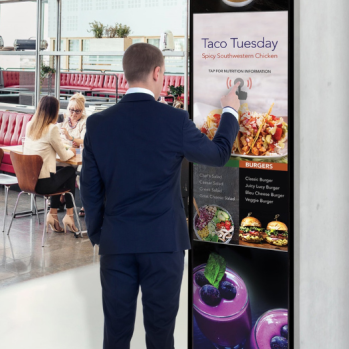
Vertical Ad Player Rental
Looking for an effective way to display dynamic content at your event or business? Our Vertical Ad Player Rental offers a sleek, high-definition digital signage solution, perfect for trade shows, conferences, retail stores, hotels, airports, and more. Whether you need to showcase promotions, event schedules, or interactive brand content, our vertical digital ad players provide an eye-catching and professional display.
-
Vertical Interactive Touch Screen KIOSK Rental
Engage your audience with our 50” interactive vertical touch screen kiosk, perfect for events, trade shows, and wayfinding. Featuring full HD display, custom branding, Wi-Fi connectivity, and multi-touch interactivity, it’s a sleek, eco-friendly solution for dynamic content and real-time updates. Plug & play ready—boost engagement instantly!
KIOSK Display Rental San Antonio
San Antonio Video Wall provides KIOSK Display Rental in San Antonio, TX for trade shows, conventions, corporate events, exhibitions, product launches, registration areas, brand activations, technology events, sponsor areas, and other environments requiring interactive or digital attendee-facing displays.
KIOSK Display Rental Features
Horizontal & Vertical Display Formats
The available lineup includes both horizontal and portrait-oriented kiosk formats. This allows the physical display orientation to match maps, catalogs, forms, directories, advertisements, mobile-style interfaces, and other event content.
Interactive Touch Screen Options
Dedicated touch-oriented products include the 43 Inch Horizontal Touch Screen Kiosk, Touch Screen Kiosk, Tradeshow Interactive Kiosk, and Vertical Interactive Touch Screen Kiosk. Pasted text
Giant Device-Style Displays
The Giant iPad and Giant iPhone provide oversized device-style formats for app demonstrations, digital catalogs, interactive marketing, technology showcases, and branded experiences.
Digital Advertising Options
The Vertical Ad Player Kiosk and Vertical Ad Player provide portrait-format options where the primary objective is displaying advertising, branding, schedules, announcements, sponsor content, or promotional media rather than attendee interaction.
Queue & Registration Applications
The Queue Kiosk can provide a dedicated attendee-facing station within check-in, registration, information, appointment, or queue workflows when the required software and supporting systems are provided.
Multi-Kiosk Deployments
Multiple kiosks can be positioned throughout a trade show booth, registration area, conference, exhibition, or other event when several attendees need simultaneous access.
Integration With Event Displays
Kiosks can be deployed alongside LED video walls, presentation displays, digital signage, event video systems, and other AV equipment, allowing large displays to handle visibility while kiosks provide individual interaction. Pasted text
What’s Included With Your KIOSK Display Rental?
Your rental can include the selected kiosk or digital display, applicable touch interface components, required display hardware, appropriate source or playback equipment based on the agreed configuration, necessary power and signal components, delivery, professional setup, kiosk positioning, content/source connection, system configuration, pre-event testing, technical support based on scope, and post-event removal.
Registration platforms, lead-capture software, queue-management systems, payment processing, attendee databases, custom applications, custom wayfinding platforms, internet service, scanners, printers, authentication systems, third-party software licenses, custom physical branding, data integrations, and extended onsite technicians should be confirmed separately.
KIOSK Displays Available for Rent
43 Inch Horizontal Touch Screen KIOSK
The 43 Inch Horizontal Touch Screen KIOSK Rental provides a specifically identified 43-inch landscape interactive surface for attendee-facing digital content.
Key Features: 43-inch listed screen size, horizontal orientation, touch-screen interaction, wide digital interface.
Best For: Product catalogs, maps, floor plans, interactive presentations, digital brochures, product comparisons, information lookup, demonstrations, and brand experiences.
The horizontal orientation is particularly useful for content designed around wide layouts, diagrams, maps, or multiple information panels. Pasted text
Giant iPad
The Giant iPad Rental provides an oversized tablet-style format for interactive event experiences.
Key Features: Giant tablet-style presentation, interactive application potential, familiar device-inspired format, attendee-facing digital experience.
Best For: Product demonstrations, interactive catalogs, surveys, digital brochures, photo galleries, presentations, event applications, registration interfaces, and brand activations.
The product name describes the format. Exact operating system, dimensions, supported applications, and technical specifications should be confirmed for the selected unit.
Giant iPhone
The Giant iPhone Rental provides an oversized smartphone-style display concept suitable for digital experiences originally designed around mobile-style interfaces.
Key Features: Giant smartphone-style format, interactive application potential, mobile-interface presentation, distinctive event display.
Best For: Mobile app demonstrations, website demonstrations, technology exhibitions, product launches, software presentations, interactive marketing, and branded experiences.
Application compatibility should be tested before the event rather than assuming every mobile application will operate directly on the kiosk.
Queue Kiosk
The Queue Kiosk Rental provides a dedicated physical station for attendee-facing workflows involving waiting, routing, check-in, or information.
Key Features: Queue-oriented kiosk format, attendee-facing station, workflow integration potential, event-flow applications.
Best For: Registration areas, check-in points, appointment workflows, guest services, information lookup, attendee routing, and managed queue environments.
Queue-management software and backend systems are separate requirements unless specifically included.
Touch Screen Kiosk
The Touch Screen Kiosk Rental provides a general-purpose interactive station for attendees who need direct access to digital information or compatible applications.
Key Features: Touch-screen interaction, self-service application potential, event-kiosk format, flexible digital-content use.
Best For: Event information, presentations, surveys, product selection, digital catalogs, schedules, maps, directories, forms, and branded experiences.
Tradeshow Interactive Kiosk
The Tradeshow Interactive Kiosk Rental is designed for exhibition environments where attendees need to actively explore booth content.
Key Features: Trade-show-focused interactive format, attendee self-service, digital-content exploration, booth engagement applications.
Best For: Product catalogs, product configurators, lead forms, surveys, demonstrations, digital brochures, interactive presentations, promotional content, and contact forms.
For larger exhibits, multiple kiosk stations can help accommodate simultaneous visitor interaction. Pasted text
Vertical Ad Player Kiosk
The Vertical Ad Player Kiosk Rental provides a portrait-format digital display for promotional and informational content.
Key Features: Vertical orientation, digital advertising format, kiosk presentation, event-signage applications.
Best For: Sponsor advertisements, event branding, schedules, promotional graphics, product promotions, announcements, directional information, digital posters, and video.
Vertical Ad Player
The Vertical Ad Player Rental provides another portrait-oriented digital display option where touch interaction is not necessarily required.
Key Features: Portrait display format, non-interactive signage applications, digital messaging, distributed display potential.
Best For: Sponsor visibility, promotional content, schedules, directions, branding, advertisements, event announcements, and information displays.
Vertical Interactive Touch Screen KIOSK
The Vertical Interactive Touch Screen KIOSK Rental combines portrait orientation with attendee interaction.
Key Features: Vertical orientation, touch-screen interaction, kiosk format, mobile-style interface potential, self-service applications.
Best For: Interactive directories, schedules, product browsing, digital catalogs, surveys, registration interfaces, wayfinding, information lookup, and interactive advertising. Pasted text
KIOSK Display Rental Applications
Kiosk displays can support interactive presentations, product catalogs, digital brochures, event schedules, maps, directories, floor plans, videos, promotional content, surveys, forms, product information, advertisements, websites, demonstrations, and compatible interactive applications.
More advanced workflows—including attendee registration, check-in, lead capture, queue management, product configuration, database-connected directories, payment, real-time wayfinding, or personalized experiences—require appropriate software and supporting integrations.
Events Where KIOSK Displays Are Used
Trade Shows & Exhibitions
Interactive kiosks allow booth visitors to explore products, demonstrations, catalogs, specifications, forms, and branded content at their own pace.
Conferences & Conventions
Kiosks can support schedules, directories, maps, registration workflows, speaker information, sponsor content, and other attendee resources.
Corporate Events
Digital kiosks can provide agendas, company information, presentations, surveys, product content, and interactive experiences.
Product Launches
Giant device-style and interactive kiosks can support product demonstrations, specifications, videos, digital catalogs, and launch content.
Technology Events
Giant iPhone, Giant iPad, horizontal touch screens, and other interactive kiosks can provide dedicated interfaces for software, website, and application demonstrations.
Registration & Check-In Areas
Queue and touch kiosks can provide the attendee-facing hardware for registration and check-in when integrated with the appropriate event platform.
Brand Activations
Interactive displays can support surveys, promotional experiences, product exploration, digital campaigns, and other compatible branded interactions.
Sponsor & Advertising Areas
Vertical ad players can distribute sponsor logos, promotional videos, advertisements, schedules, announcements, and other digital signage.
Why Choose San Antonio Video Wall for KIOSK Display Rental?
Nine Kiosk & Digital Display Options
The category includes nine listed products, covering horizontal touch, vertical touch, giant device-style, queue, trade show, and digital advertising applications. Pasted text
Interactive & Non-Interactive Formats
Not every event display needs touch functionality. Interactive attendee stations can be combined with non-interactive digital advertising and information displays.
Horizontal & Portrait Orientations
The available formats allow the display orientation to be matched to the content and intended interaction instead of forcing every application into the same screen layout.
Multi-Kiosk Event Deployments
Several kiosk stations can be distributed around exhibits, registration areas, entrances, or other event spaces when attendee volume requires more than one interaction point.
Event-Specific Configuration
Kiosk type, orientation, software, content, connectivity, user workflow, placement, and expected interaction volume can be considered together when planning the rental.
How We Deliver Your KIOSK Display Rental
1. Tell Us About Your Event
Provide your event date, San Antonio location, required kiosk quantity, placement locations, preferred orientation, and intended attendee interaction.
2. Kiosk Selection
A horizontal touch display, vertical interactive kiosk, Giant iPad, Giant iPhone, Queue Kiosk, trade show kiosk, or digital ad player is selected according to the application.
3. Content & Software Planning
The content format, application, interaction requirements, orientation, connectivity, peripherals, attendee workflow, and placement are reviewed.
4. Delivery
The selected kiosks and agreed supporting equipment are delivered according to the event schedule.
5. Professional Setup
Kiosks are positioned, connected, configured, and prepared for the intended event application.
6. Content & Interaction Testing
Touch functionality where applicable, content, software, source equipment, connectivity, and agreed workflows are tested before attendee use.
7. Event Support
Technical or onsite support can be provided according to the agreed rental scope.
8. Strike & Removal
The kiosks and associated rental equipment are removed following the event.
Frequently Asked Questions About KIOSK Display Rental
What KIOSK Displays are available in San Antonio?
Available options include 43 Inch Horizontal Touch Screen KIOSK, Giant iPad, Giant iPhone, Queue Kiosk, Touch Screen Kiosk, Tradeshow Interactive Kiosk, Vertical Ad Player Kiosk, Vertical Ad Player, and Vertical Interactive Touch Screen KIOSK. Pasted text
What is an Interactive Kiosk?
An interactive kiosk is a digital display station that allows attendees to directly interact with configured content, typically through a touchscreen or another supported interface.
Do you offer both horizontal and vertical kiosks?
Yes. The category includes a 43 Inch Horizontal Touch Screen KIOSK and a Vertical Interactive Touch Screen KIOSK, along with vertical digital ad-player formats. Pasted text
Can I rent a Giant iPad?
Yes. Giant iPad Rental is one of the listed kiosk products.
Do you have a Giant iPhone?
Yes. Giant iPhone Rental is also included in the category.
Can a kiosk be used for trade show lead generation?
Yes, as the attendee-facing interface for compatible lead-generation software. Forms, databases, CRM integrations, data handling, and lead-capture platforms should be planned separately.
Can I use a kiosk for event registration?
Yes, when integrated with a compatible registration workflow. Registration software, attendee databases, scanners, printers, authentication, and other peripherals should not automatically be assumed to be included.
Can kiosks display websites?
Potentially. Web-based content requires suitable hardware, software or browser support, connectivity, and a website designed appropriately for public touchscreen use.
Can I run my own application?
Potentially, but compatibility depends on the application’s operating-system, hardware, software, connectivity, and interface requirements. It should be tested before the event.
Can kiosks be used for wayfinding?
Yes. They can display maps, directories, floor plans, and navigation information. Dynamic routing or database-connected wayfinding requires appropriate software and event data.
Do you have non-touch digital kiosks?
Yes. The Vertical Ad Player is specifically described as an option where touch interaction is not necessarily required. Pasted text
Can several kiosks be used at one event?
Yes. Multiple stations can be useful for larger booths, busy registration areas, product demonstrations, or events where several visitors need simultaneous access.
How many kiosks should I rent?
The appropriate quantity depends on expected attendee volume, average interaction time, number of locations, event duration, and whether the kiosk is optional or part of a required workflow such as registration. Pasted text
Can the kiosks collect attendee information?
A kiosk can provide the interface for forms or lead-capture applications. Collection, storage, security, consent, and processing of attendee data depend on the software and systems being used rather than the display hardware alone.
Can a kiosk be used only for advertising?
Yes. The Vertical Ad Player and Vertical Ad Player Kiosk can be used for sponsor content, promotions, schedules, branding, announcements, and other digital messaging. Pasted text
Is internet included?
Internet connectivity should be confirmed separately. Any experience dependent on web-based services should be planned around the connectivity available at the venue. Pasted text
How much does KIOSK Display Rental cost in San Antonio?
Pricing depends on kiosk type, quantity, rental duration, software requirements, connectivity, content, peripherals, placement, delivery, setup, branding requirements, and technical support.